
![[AndyB] Convert image by domain](/data/resource_icons/4/4287.jpg?1722921295)
- Compatibilidade com XF
- 2.2.x
- 2.3.x
The Convert image by domain add-on will convert hot linked images in messages to attachments. Hot linked images are those images that have been inserted using the Image icon in the editor toolbar.
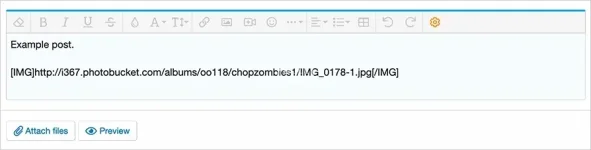
(Example of IMG tag)
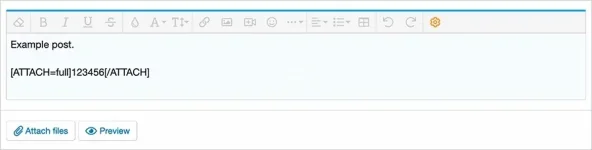
(Example of ATTACH tag)
(Example of Maximum attachment image dimensions selection)

(Example of Options page)
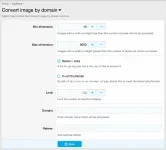
(Example of Convert image by domain page)
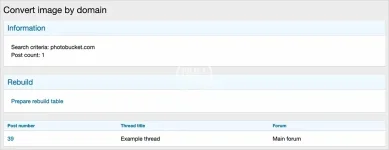
(Example of Rebuild now button)

Features:
Although the screenshot above says you can use 0 or blank, this add-on requires you to use a positive value for the Maximum attachment image dimensions settings. I suggest using 1600 x 1600.
Admin control panel -> Setup -> Options -> Attachments -> Maximum attachment image dimensions
How to use:
Q: I have an older forum with 1 million posts. How long will it take to convert all IMG tags to attachments?
A: Several hours is normal.
Q: Some hot linked image are not converted, why is this?
A: If a hot linked image is either too small or too large, or the dimensions are not able to be read, those images are not converted and will require manual conversion.
Q: Are attachments reused, meaning if the same attachment is located in several posts does each one use up disk space?
A: Each attachment is saved separately, however this is not a problem these days as disk space is so inexpensive.
Q: Does this add-on convert hot linked images in other areas besides posts?
A: No.
Q: Should I run this add-on once every few months to catch any new hot linked images not converted?
A: Yes.
Q: I want to convert photobucket images what should I do?
A: In the options page add the following:
Domain = photobucket.com
Referer = https://photobucket.com
Q: Can I run this add-on from CLI?
A: Yes. Navigate to the folder your forum runs in, then use the following command php cmd.php xf-rebuild:convertimagebydomain
(Example of IMG tag)
(Example of ATTACH tag)
(Example of Maximum attachment image dimensions selection)
(Example of Options page)
(Example of Convert image by domain page)
(Example of Rebuild now button)
Features:
- Images greater than maximum width and height settings in Admin Control Panel will be resized.
- Links surrounding attachments automatically removed.
Although the screenshot above says you can use 0 or blank, this add-on requires you to use a positive value for the Maximum attachment image dimensions settings. I suggest using 1600 x 1600.
Admin control panel -> Setup -> Options -> Attachments -> Maximum attachment image dimensions
How to use:
- Update the Options page with the domain you want to process.
- In your browser add 'convertimagebydomain' to your forum URL.
- Click the 'Prepare rebuild table' link.
- Go to the Tools menu in the Admin control panel and click 'Convert all images to attachments' link.
Q: I have an older forum with 1 million posts. How long will it take to convert all IMG tags to attachments?
A: Several hours is normal.
Q: Some hot linked image are not converted, why is this?
A: If a hot linked image is either too small or too large, or the dimensions are not able to be read, those images are not converted and will require manual conversion.
Q: Are attachments reused, meaning if the same attachment is located in several posts does each one use up disk space?
A: Each attachment is saved separately, however this is not a problem these days as disk space is so inexpensive.
Q: Does this add-on convert hot linked images in other areas besides posts?
A: No.
Q: Should I run this add-on once every few months to catch any new hot linked images not converted?
A: Yes.
Q: I want to convert photobucket images what should I do?
A: In the options page add the following:
Domain = photobucket.com
Referer = https://photobucket.com
Q: Can I run this add-on from CLI?
A: Yes. Navigate to the folder your forum runs in, then use the following command php cmd.php xf-rebuild:convertimagebydomain

![[AndréB] Usuário Agente](/data/resource_icons/4/4358.jpg?1720149256)

![[AndréB] Converter imagem](/data/resource_icons/7/7401.jpg?1720149273)

![[AndyB] Convert image media gallery](/data/resource_icons/7/7400.jpg?1720149273)