
![[AndyB] Most threads](/data/resource_icons/15/15280.jpg?1720149311)
- XF Compatibility
- 2.2.x
Displays a Most threads widget.
(Example of Most threads widget)

(Example of Options page)
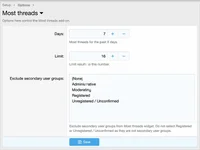
(Example of User group permissions)

Features:
Normally you will select Yes to the following User groups:
Registered
Unregistered / Unconfirmed
Cron entries:
This add-on updates the widget every hour. When you first install the add-on please run the Cron entries manually in order to see the widget:
Admin control panel -> Tools -> Cron entries -> Most threads
Questions and Answers:
Q: When do the thread count numbers update?
A: They are updated once per hour by Cron entry.
(Example of Most threads widget)
(Example of Options page)
(Example of User group permissions)
Features:
- Option to exclude secondary user groups.
- All phrases start with mostthreads_ for your convenience.
- Admin Control Panel -> Appearance -> Widgets
- Widget definition = Most threads
- Widget key = most_threads
- Title = (leave blank)
- Display in positions = Forum list: Sidebar
- Click Save.
Normally you will select Yes to the following User groups:
Registered
Unregistered / Unconfirmed
Cron entries:
This add-on updates the widget every hour. When you first install the add-on please run the Cron entries manually in order to see the widget:
Admin control panel -> Tools -> Cron entries -> Most threads
Questions and Answers:
Q: When do the thread count numbers update?
A: They are updated once per hour by Cron entry.


![[AndyB] Featured threads](/data/resource_icons/2/2859.jpg?1720149251)
![[AndyB] All threads](/data/resource_icons/15/15364.jpg?1720149311)
![[AndyB] Media to threads all](/data/resource_icons/17/17128.jpg?1720149323)