
![[AndyB] Audio](/data/resource_icons/6/6838.jpg?1720149273)
- XF Compatibility
- 2.3.x
- 2.2.x
Adds Audio BB code media.
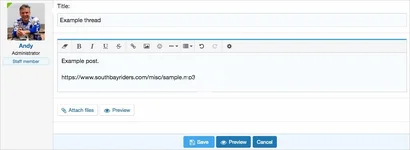
(Example after post is saved)

Features:
Q: Is there a way to setup certain tags to autoplay?
A: No.
(Example after post is saved)
Features:
- Uses HTML <audio> tag.
- Plays MP3 files.
- Simple paste URL into message and Audio player will be embedded.
- URL's can be internal or external.
- Paste any URL which the .MP3 extension into a message.
- Save post.
- Click play button to hear audio.
- Download Andy-Audio-1.1.zip and unzip it.
- Copy the src/addons/Andy/Audio directory to your server.
- From the Admin Control Panel Install the add-on.
- Create a folder called /misc/ on the web root of your server.
- Copy the src/Andy/Audio/audio.php file to your newly created /misc/ folder on your server.
- In the Admin control panel go to the following page:
Admin control panel -> Appearance -> Templates -> _media_site_embed_audio
Q: Is there a way to setup certain tags to autoplay?
A: No.


![[AndyB] Advertising responsive](/data/resource_icons/7/7380.jpg?1720149273)

