
cPanel Extended For WHMCS

CPanel Extendido para WHMCS 3.15.1 Not Nulled

Cadastre-se ou faça login para download gratuito
  • Criador do tópico Criador do tópico newimage
  • Data de início Data de início
i checked code again ,please make sure WHMCS DailyCronJob have normal work.

how to check daily Cron run normal?

with phpmyadmin or other run sql to display localkey information.
SQL:
 SELECT * FROM `tblconfiguration` WHERE `setting` LIKE 'cpanel_extended_localkey' ORDER BY `id` DESC

please see update time it is new or it is not update.

force run whmcs cron

php -q crons/cron.php --force -vvv
 
i checked code again ,please make sure WHMCS DailyCronJob have normal work.

how to check daily Cron run normal?

with phpmyadmin or other run sql to display localkey information.
SQL:
 SELECT * FROM `tblconfiguration` WHERE `setting` LIKE 'cpanel_extended_localkey' ORDER BY `id` DESC

please see update time it is new or it is not update.

force run whmcs cron

php -q crons/cron.php --force -vvv
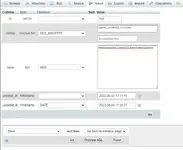
It's updated date showing today, but when I forced cron update time is not updating
 
i checked code again ,please make sure WHMCS DailyCronJob have normal work.

how to check daily Cron run normal?

with phpmyadmin or other run sql to display localkey information.
SQL:
 SELECT * FROM `tblconfiguration` WHERE `setting` LIKE 'cpanel_extended_localkey' ORDER BY `id` DESC

please see update time it is new or it is not update.

force run whmcs cron

php -q crons/cron.php --force -vvv
I checked my daily cron work perfectly but update time is same in php my admin is there any other way to fix that
 
To fix the problem in the Function section, set it to md5. Re-enter the license in the Value section.
Visualizar anexo 22866
no .please don't do this like it ,you can remove this record ,and in backend using this plugin function.normally plugin will auto to create localkey and update it when need to update
 
Voltar
Top