

- XF Compatibility
- 2.2.x
- Short Description
- Install Editor & BB Code Manager 1.2.1 Patch Level 1 for easy custom bbcode creation and add text-shadow command with color picker to your WordPress editor.
I share with you my bbcode color shadow
I use the addon Editor & BB Code Manager 1.2.1 Patch Level 1
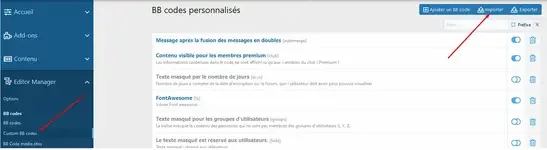
1 - In your CP admin go to Custom BB codes and click on Import and select the xlm file that is being downloaded:
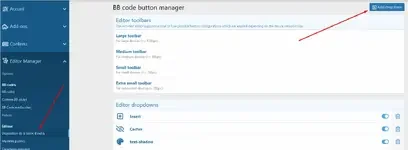
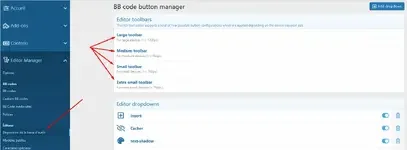
2 - Create a drop-down menu in the toolbar go to Toolbar layout and click on Add dropdown:
3 - Then fill in the fields:
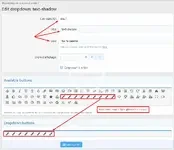
Command ID: sha_1
Title: text-shadow
Icon: fas fa-palette
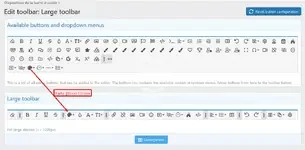
4 - Then drag the iconsin the bar below.
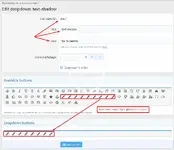
5 - Still in the Toolbar layout, select the toolbar(s) where you want to display the bbcodes.
6 - Install the icon in the toolbar:
Result :
I use the addon Editor & BB Code Manager 1.2.1 Patch Level 1
1 - In your CP admin go to Custom BB codes and click on Import and select the xlm file that is being downloaded:
2 - Create a drop-down menu in the toolbar go to Toolbar layout and click on Add dropdown:
3 - Then fill in the fields:
Command ID: sha_1
Title: text-shadow
Icon: fas fa-palette
4 - Then drag the iconsin the bar below.
5 - Still in the Toolbar layout, select the toolbar(s) where you want to display the bbcodes.
6 - Install the icon in the toolbar:
Result :


![[DigitalPoint] App for Cloudflare](/data/resource_icons/13/13174.jpg?1771777610)
![[AndyB] BBCode parser](/data/resource_icons/6/6069.jpg?1743490056)
![[AndyB] Disallow bold bbcode](/data/resource_icons/7/7384.jpg?1720149273)
![[AndyB] HTML to bbcode](/data/resource_icons/23/23081.jpg?1734064672)