

- XF Compatibility
- 2.2.x
- Short Description
- PayTR offers secure online payments with virtual POS integration for websites, providing PCI-DSS Level 1 service and Central Bank of Turkish Republic license. Easily set up via free membership; sellers add PayTR payment method to checkout pages. Secure card transactions ensure both buyer and seller's safety. For detailed setup instructions, visit the official PayTR Merchant Panel.

FreePayTR'a başvurabiliryou can integrate virtual POS to your site right now.
For Installation and Usage Guide,Tıklayınız.You canapply to PayTRfree of charge and integrate virtual POS to your site immediately.
PAYTR is a service that provides website owners a way to get secure online payments from websites in a fast and simple way with the help of a PCI-DSS Level 1 Service Provider adapted technical infrastructure and experienced staff. It also has the license of the Central Bank of Turkish Republic. PAYTR ensures both the store's payment security and customer card security through its PCI-DSS Level 1 Service Provider adapted technical infrastructure by its experienced staff.
Sellers who use the PayTR Virtual POS payment methods add-on provide customers with an option to choose the PayTR payment method on the checkout page. Sellers using PayTR payment methods provide a way for customers to make secure payments from PAYTR services. Customers using the PayTR payment method are allowed to pay securely through the store's PAYTR services. Customers can pay with multiple cards such as American Express, Visa Electron, Visa Debit, MasterCard, MasterCard Debit, etc. The module allows customers to pay either in a single transaction or installment. After the customer makes the payment, the amount paid is transferred to the seller's PAYTR account.Account & Pricing
- []To use this add-on, you need to have a PayTR membership.[]*Sellers can create a free PayTR account before or after setting up the PayTR Virtual POS iFrame API add-on.*[]*Sellers who want to create a PayTR account can apply here.[]PayTR receives commission only from the payments. PayTR doesn’t receive any fees or extra costs.
- []Admin can enable or disable PayTR Payment Method from admin panel.[]Administrator can make category-based installment settings from the admin panel.[]Card information is not kept on the server. It is transmitted to PayTR servers within the scope of PCI-DSS compliance.
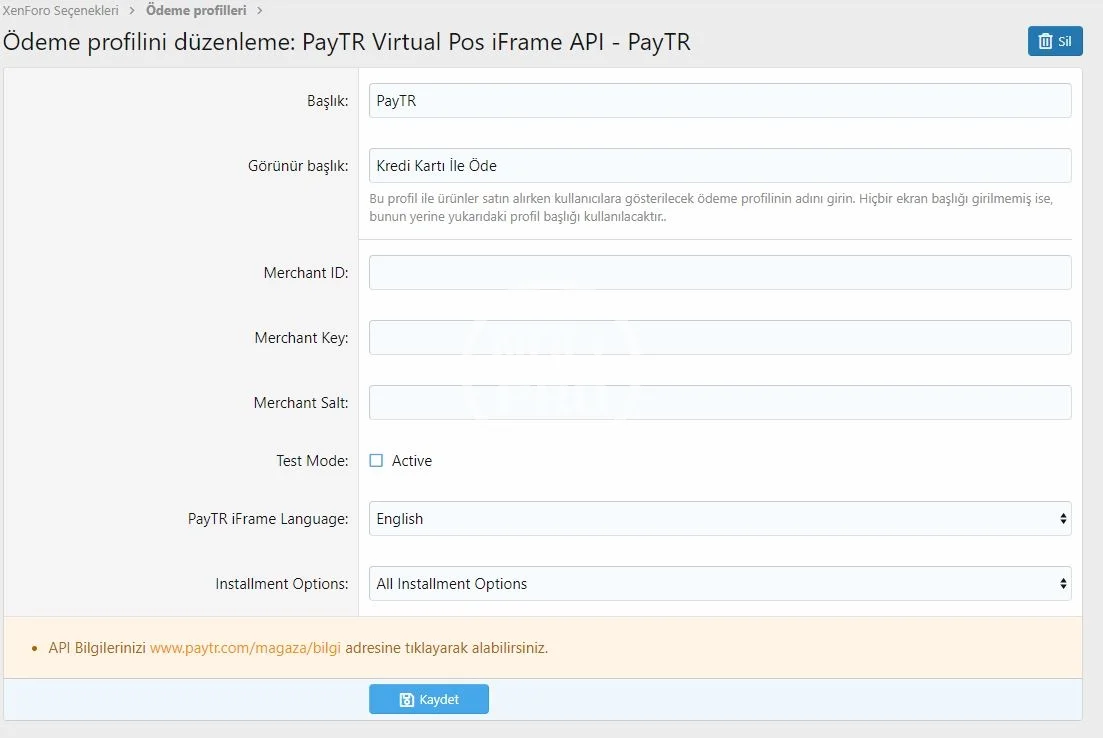
- []*Sellers can go to PayTR Virtual POS iFrame API add-on by clicking the payment method link after they have logged in to Xenforo Admin Panel. PayTR Virtual POS iFrame API add-on settings are done on this page.[]* Copy MERCHANT ID, MERCHANT KEY and MERCHANT SALT values from PayTR Merchant Panel page, then paste them on a related place in PayTR Virtual POS iFrame API add-on.
- []Customers move on to the payments step after they have added the products they have chosen from the seller's store to the shopping cart.[]*]The customers move on by choosing PayTR Virtual POS iFrame API payment method.[]PayTR service brings a PCI-DSS Level 1 Service Provider adapted and SSL licensed checkout page to the customer's screen.[]Customers complete their payments on this page by typing their card details.[]Customers are directed to the page that will only be displayed in case of successful payment after completing the payment.[]PayTR service sends a notification regarding that the operation has succeeded to PayTR Virtual POS iFrame API add-on and updates the order status.
On the checkout page, customer card and payment information are encrypted and transferred to PayTR servers through an iFrame window. Security measures ensure these processes use TOKEN creation. Customer data is stored on Xenforo servers.
After entering card information, customers move to a 3D security coverage page. They complete their payment after entering the code sent to their registered mobile number. No card or customer information is stored on PayTR or Xenforo servers. For more details, visit the PayTR Security Page.


![[DigitalPoint] App for Cloudflare](/data/resource_icons/13/13174.jpg?1771777610)
![[021] Post as user](/data/resource_icons/13/13971.jpg?1720149306)
![[AddonsLab] Post Limit Per Node](/data/resource_icons/0/54.jpg?1759484747)
![[AddonsLab] Unread Post Count](/data/resource_icons/0/259.jpg?1720149240)