
![[AndyB] XFRM ad manager](/data/resource_icons/4/4408.jpg?1720149256)
- XF 兼容性
- 2.2.x
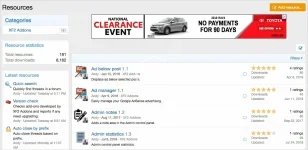
Easily manage your Google AdSense in XenForo Resource Manager.
(Example of AdSense on overview page
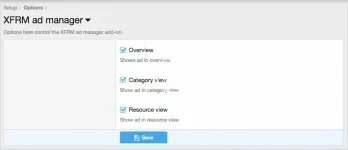
(Example of Options page)
(Example of User group permissions)

Features:
Q: How can I control the spacing of the ads?
A: Edit the andy_xfrmadmanager.less template.
(Example of AdSense on overview page
(Example of Options page)
(Example of User group permissions)
Features:
- Ads are displayed in overview, category view and resource view.
- Options page allows disabling ads from specified areas.
- User Group Permissions determine which user groups see ads.
- Edit the andy_xfrmadmanager template and update using your AdSense code.
- Set the appropriate user group permissions, typically the following two user groups are set to Yes.
Registered
Unregistered / Unconfirmed
- Log into your Google AdSense account.
- Click My Ads.
- Click Ad units.
- Click New ad unit.
- Click Text and display ads.
- Enter a Name for this ad. Example enter "Responsive" as the name.
- Save and get code.
Q: How can I control the spacing of the ads?
A: Edit the andy_xfrmadmanager.less template.


![[安迪宝] 论坛回复禁](/data/resource_icons/5/5016.jpg?1743490331)
![[AndyB] Affiliate manager](/data/resource_icons/4/4391.jpg?1720149256)
![[AndyB] Attachment Manager](/data/resource_icons/4/4500.jpg?1720149262)
![[AndyB] Ad manager](/data/resource_icons/8/8631.jpg?1720149279)